Laravel Eloquent Relationships
Laravel Eloquent relationships map how models connect — hasMany, belongsTo, belongsToMany, and more. Define them once, then load related rows with with() instead of stuffing joins into every query.
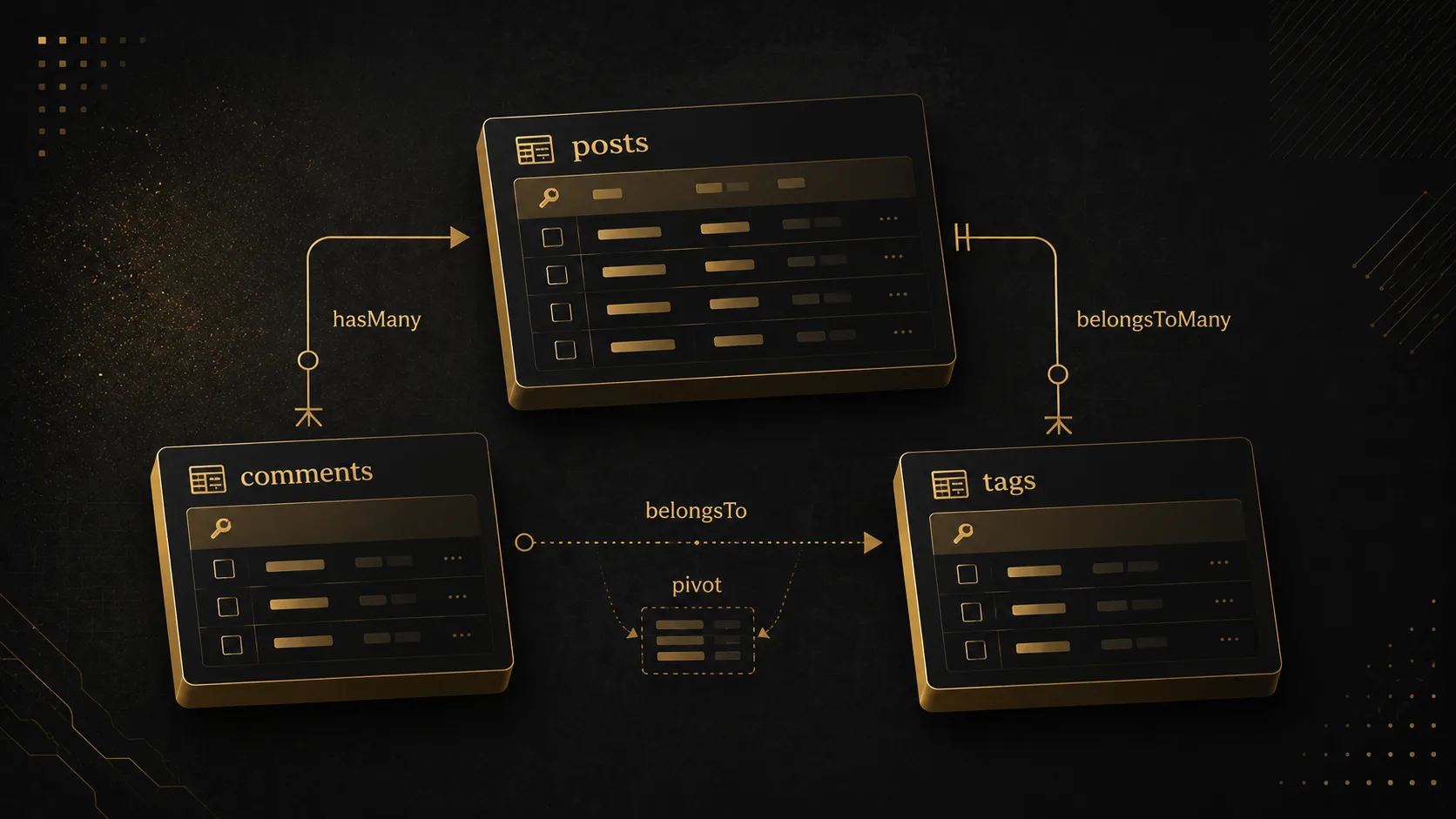
Quick Answer
Laravel Eloquent relationships are methods on your models that describe how tables connect: a post has many comments, a comment belongs to a post, a user belongs to many roles. You use them when related rows should come back as objects, not as a pile of join columns. Define the relation once, then load it with with() so you are not firing a query per row.
Quick Facts
| Item | Details |
|---|---|
| Topic | Laravel Eloquent Relationships |
| Category | Laravel / PHP / Eloquent |
What Is Laravel Eloquent Relationships?
This is not Query Builder join(). A join returns a flat row. A relationship returns another model — or a collection of them — with its own methods, casts, and nested relations.
Eloquent infers a lot from names. Post has many Comment models, so it looks for comments.post_id unless you pass custom keys. That convention is why a one-line method works, and why a renamed column silently returns empty collections.
If you already live in Laravel, this is the layer you touch every day: posts and authors, orders and items, users and roles. If you are coming from raw SQL, think of it as a named, reusable join that hydrates models instead of arrays.
Why It Matters
- Queries stay in one place — change the foreign key once on the relation, not in every controller.
- N+1 shows up in the log, not in “random slowness” —
with()andwithCount()are the difference between 2 queries and 200. - Nested data is boring to assemble by hand —
$post->author->namebeats stitching arrays after a three-table join.
How It Works
Eloquent does not store a graph in the database. It stores foreign keys (or a pivot table). The relationship method is a query factory: call it as a method to keep chaining, or as a property to run the query and cache the result on the model.
flowchart LR
  U[users] -->|hasMany user_id| P[posts]
  P -->|hasMany post_id| C[comments]
  C -->|belongsTo| P
  P -->|belongsToMany| PT[post_tag]
  T[tags] -->|belongsToMany| PT
- Keys —
hasMany/belongsTouse a column likepost_id.belongsToManyuses a pivot (post_tag) with two foreign keys. Morphs addcommentable_type+commentable_id. - The method vs the property —
$post->comments()is a query you can still constrain.$post->commentsexecutes it. Mix them up and you either hit the database twice or wonder whywhere()is missing. - Lazy vs eager — accessing the property with no preload runs one query per parent.
Post::with('comments')runs two: all posts, then all comments for those ids. Same data, different query count.
flowchart TB
  subgraph one [hasMany - one parent]
    P1[posts] --> C1[comments.post_id]
  end
  subgraph many [belongsToMany - both sides]
    P2[posts] --> PV[post_tag]
    TG[tags] --> PV
  end
The six you will actually type:
hasOne/belongsTo— profile belongs to user; user has one profile.hasMany/belongsTo— post has many comments; comment belongs to post.belongsToMany— posts and tags. Pivot can hold extra columns (withPivot,withTimestamps).hasManyThrough— country → users → posts without a directcountry_idon posts.morphTo/morphMany— comments that can hang off posts or projects.
Step-by-Step Guide
Step 1: Put the foreign key on the child table
Migration first. Parent table has no array of child ids. Comments hold post_id. For tags, create post_tag with post_id and tag_id (and a unique index on the pair so you cannot attach the same tag twice).
flowchart LR
  posts[posts.id] -->|referenced by| comments[comments.post_id]
  posts -->|referenced by| pivot[post_tag.post_id]
  tags[tags.id] -->|referenced by| pivot2[post_tag.tag_id]
Schema::create('comments', function (Blueprint $table) {
    $table->id();
    $table->foreignId('post_id')->constrained()->cascadeOnDelete();
    $table->text('body');
    $table->timestamps();
});
Done when php artisan migrate succeeds and comments.post_id exists. Skip this and Eloquent will still “work” — it just returns empty relations.
Step 2: Define both sides of the relationship
Write the method on both models. Inverse relations are how you walk back without guessing column names later.
// app/Models/Post.php
public function comments(): HasMany
{
    return $this->hasMany(Comment::class);
}

public function tags(): BelongsToMany
{
    return $this->belongsToMany(Tag::class)->withTimestamps();
}

// app/Models/Comment.php
public function post(): BelongsTo
{
    return $this->belongsTo(Post::class);
}
If the column is not post_id — say author_id on posts — pass it: $this->belongsTo(User::class, 'author_id'). Miss that argument and you get user_id in the SQL, then a null author and a very quiet bug.
Done when php artisan tinker can do Post::first()->comments and you see a collection, not an error.
Step 3: Eager-load on the query you actually run
Do not load relations in a Blade loop. Put them on the query in the controller (or a query scope).
flowchart TB
  subgraph lazy [Lazy loading]
    L1[SELECT posts] --> L2[SELECT comments WHERE post_id = 1]
    L1 --> L3[SELECT comments WHERE post_id = 2]
    L1 --> L4[SELECT comments WHERE post_id = N]
  end
  subgraph eager [Post with comments]
    E1[SELECT posts] --> E2[SELECT comments WHERE post_id IN ids]
  end
$posts = Post::query()
    ->with(['comments.author', 'tags'])
    ->withCount('comments')
    ->latest()
    ->paginate(20);
Verify with DB::listen, Laravel Debugbar, or Telescope. You want a small, stable number of queries when you bump the page size from 10 to 50. If query count scales with row count, you still have N+1.
Real-World Example
Stack: Laravel 11 API + a Nuxt admin listing blog posts. Goal: show title, author name, tag pills, and comment count.
The first version looked fine in local with 8 posts:
$posts = Post::latest()->get();

foreach ($posts as $post) {
    $post->author->name;
    $post->tags->pluck('name');
    $post->comments->count();
}
Telescope showed 1 + 8 + 8 + 8 queries. Production had a few hundred posts. The listing timed out. That is N+1: one query for posts, then one per relation per row.
sequenceDiagram
  participant App
  participant DB
  App->>DB: SELECT * FROM posts
  App->>DB: SELECT * FROM users WHERE id = author_id
  App->>DB: SELECT * FROM post_tag / tags
  App->>DB: SELECT * FROM comments WHERE post_id = ?
  Note over App,DB: Repeat author, tags, comments for every post
  App->>DB: with author tags plus withCount comments
  Note over App,DB: Query count stays flat when the page grows
Second bug in the same PR: Post used author_id, but belongsTo(User::class) with no second argument. SQL looked for posts.user_id. Authors were always null. The UI showed “Unknown” and we blamed the frontend.
Fix:
public function author(): BelongsTo
{
    return $this->belongsTo(User::class, 'author_id');
}

$posts = Post::query()
    ->with(['author', 'tags'])
    ->withCount('comments')
    ->latest()
    ->paginate(20);
Use withCount when you only need a number. Loading every comment model just to call ->count() is how you blow memory on a busy post. After the change, Telescope sat at a handful of queries regardless of page size, and author names came back.
Pros & Cons
Advantages
- The mapping lives on the model, so controllers stay short.
- Eager loading and
withCount/whereHascover the 90% case without raw SQL. - Nested relations (
comments.author) stay readable compared to multi-join select lists.
Disadvantages
- Lazy loading hides cost until production traffic. Nothing in the type system stops
$post->commentsin a loop. - Name conventions fail quietly: wrong key, empty relation, no exception.
- Heavy reports still want Query Builder or SQL. Hydrating thousands of models to sum a column is the wrong tool.
Best Practices
- Define the inverse. You will need
$comment->postthe week after you ship$post->comments. - Eager-load at the query root.
Post::with('tags')in the controller, not$post->load('tags')inside a loop. - Prefer
withCount('comments')over loading the relation when the UI only shows a number. - Pass custom keys the moment the column is not
{model}_id. Do not wait for null authors. - Index foreign keys and pivot unique pairs. Relations do not invent indexes for you.
- Use
whereHas/whereDoesntHaveto filter parents by child data instead of loading everything into PHP.
Common Mistakes
- N+1 in Blade or Vue-ready JSON — you serialized
$post->commentsfor every item. Fix:with()orwithCount()on the original query; confirm in Telescope. - Wrong foreign key, empty relation — column is
author_id, relation still assumesuser_id. Fix:belongsTo(User::class, 'author_id')(andhasMany(..., 'author_id')on User). - Calling the property, then
where()—$post->comments->where('approved', true)filters in memory after loading all comments. Fix:$post->comments()->where('approved', true)->get(). - belongsToMany without a real pivot — you stored comma-separated tag ids on
posts. Fix: pivot table +attach/sync. Comma lists will not eager-load. - Forgetting
withTimestamps()on a pivot you care about —created_atonpost_tagstays null. Fix: chainwithTimestamps()on the relation.
Frequently Asked Questions
What is Laravel Eloquent Relationships?
They are model methods that tell Eloquent how two (or more) tables connect. hasMany, belongsTo, and belongsToMany are the ones you use most. After you define them, you load related models with with() instead of writing a join in every query.
How do I define Eloquent relationships in Laravel?
Add a foreign key (or pivot) in a migration, then add a typed method on the model that returns hasMany, belongsTo, or belongsToMany. Mirror the inverse on the other model. Test in tinker with Model::first()->relationName before you wire the UI.
Eloquent relationships vs Query Builder joins?
Use relationships when you want related models and nested JSON. Use Query Builder joins when you need a flat report, aggregates across huge tables, or SQL the ORM would hydrate into thousands of objects for no reason. Same database; different shape of result.
Are Laravel Eloquent relationships worth it?
Yes for CRUD apps, APIs, and admin panels — that is most Laravel work. Skip them on a one-off analytics query, or when you already have a tuned SQL view. The cost is not the feature; it is lazy loading you forgot to replace with with().
When should I use hasMany vs belongsToMany?
hasMany when the child row belongs to one parent (comments.post_id). belongsToMany when both sides can have many of the other (a post has many tags, a tag has many posts). If you are stuffing ids into a JSON column, you probably wanted a pivot.
Summary
Eloquent relationships are named mappings over foreign keys and pivots. You define hasMany / belongsTo / belongsToMany on the models, then eager-load on the query you actually run. The failure mode is not “ORM is slow.” It is one query per row, or a key name that does not match the column.
Today: pick one listing in your app, turn on query logging, and add with() / withCount() until the query count stops climbing with page size.
Key Takeaways
- Laravel Eloquent relationships describe table links as model methods, not as ad-hoc joins in every controller.
- Put the foreign key on the child table; use a pivot for many-to-many.
- Always pass custom keys when the column is not
{model}_id. with()andwithCount()are how you keep listings at a handful of queries.- Call
comments()when you still need to constrain the query;commentswhen you want the loaded collection.
Comments
0 comments · new ones appear after approval
No comments yet. Be the first to share your thoughts.
Leave a comment
Your comment will be reviewed before it appears.