Apache vs Nginx: What They Are and When to Use Each
Apache and Nginx are web servers. They take HTTP requests and return files or pass work to PHP, Node, or another app. Apache fits shared hosting and .htaccess; Nginx is the usual reverse proxy on an Ubuntu VPS.
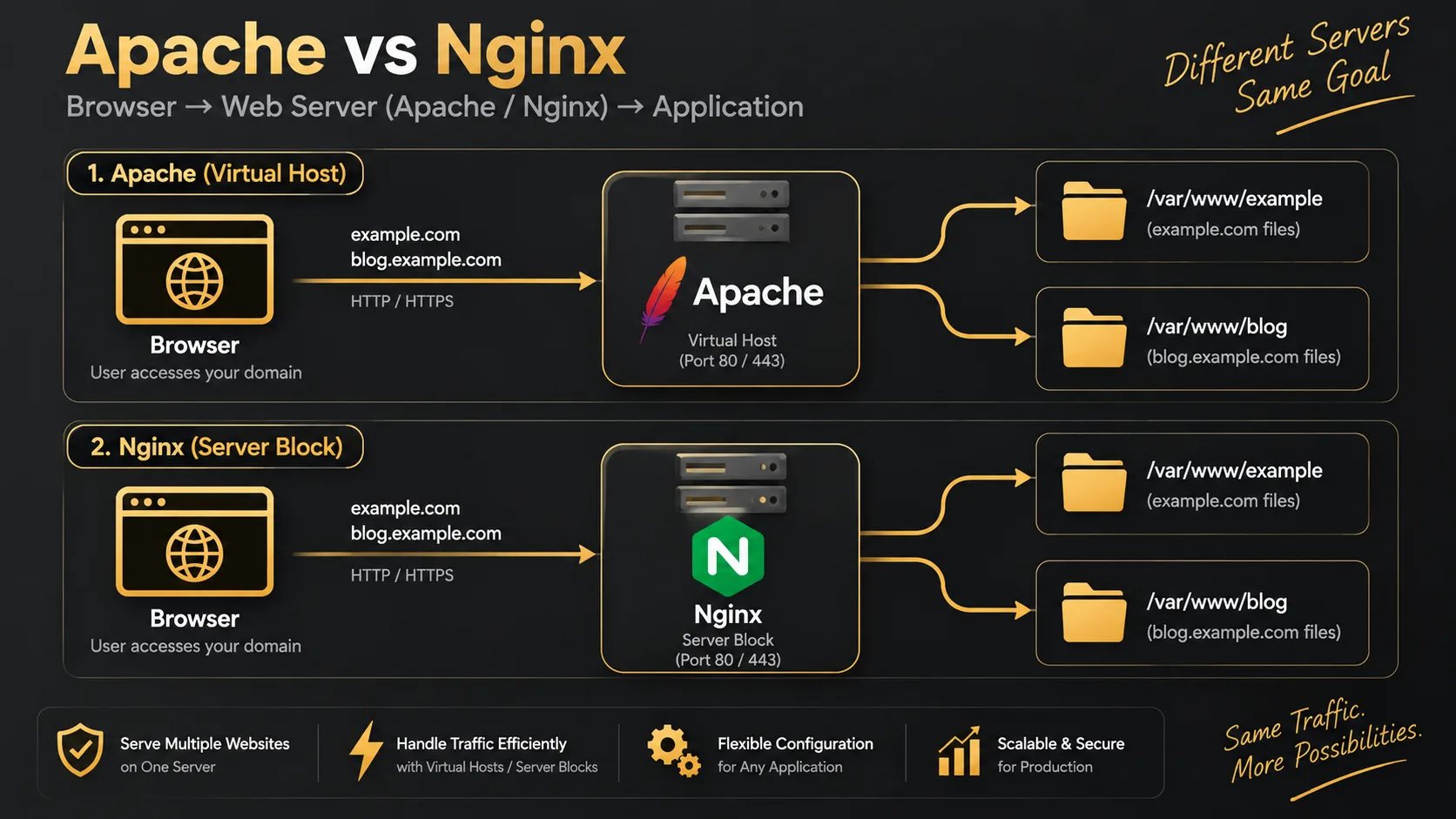
Quick Answer
Apache and Nginx are web servers. They listen on port 80/443, read the request, and either serve a file or hand it to PHP-FPM, Node, or another backend. Use Apache when you want .htaccess and classic shared hosting. Use Nginx when you want a reverse proxy on an Ubuntu VPS in front of Laravel, Nuxt, or several apps.
Quick Facts
| Item | Details |
|---|---|
| Topic | Apache vs Nginx |
| Category | Linux / Web Server / DevOps |
What Is Apache vs Nginx?
Both are programs that speak HTTP. Without one of them (or a cloud load balancer doing the same job), the internet never reaches your app on a Linux box.
Apache HTTP Server is the older, widely deployed option. A lot of shared hosting still ships it. Config often lives in virtual host files plus per-folder .htaccess.
Nginx (say “engine-x”) shows up on most developer VPSes. It is strong at static files and as a reverse proxy: terminate SSL, then pass PHP to php-fpm or proxy to Node on port 3000.
They are not languages. They are not databases. They sit in front of your app. On Ubuntu you install either with apt; running both on port 80 at once will fight for the port.
flowchart LR
  Browser --> Web[Apache or Nginx]
  Web --> Static[HTML CSS images]
  Web --> PHP[PHP-FPM / Laravel]
  Web --> Node[Node / Nuxt]
Why It Matters
- Wrong tool for the job wastes a weekend. Nuxt behind Apache with no clear proxy plan hurts; ignoring .htaccess after years of cPanel habits also hurts.
- On one Ubuntu VPS you often put Nginx in front of everything — static site, Laravel, Node preview — using virtual hosts per domain.
- Internet “which is faster” fights are noisy. For a portfolio or small SaaS, a correct config beats a micro-benchmark.
How It Works
Apache traditionally uses a process/thread model (worker / event / prefork MPMs). Modules plug in deeply — rewrite, auth, and historically mod_php. Today php-fpm is common on Apache too. .htaccess lets you override rules per folder without reloading the main server.
Nginx uses an event-driven model. A few workers handle many connections. It does not execute PHP itself; it talks to php-fpm over a socket. Rewrites live in the server block — there is no .htaccess.
flowchart TB
  subgraph apache [Apache]
    A1[Request] --> A2[VirtualHost + modules]
    A2 --> A3[.htaccess]
    A2 --> A4[File or PHP]
  end
  subgraph nginx [Nginx]
    N1[Request] --> N2[server block]
    N2 --> N3[try_files / proxy_pass]
    N3 --> N4[File or upstream]
  end
flowchart LR
  B[Browser] --> NX[Nginx :443]
  NX -->|proxy_pass| NU[Nuxt :3000]
  NX -->|fastcgi| PF[php-fpm Laravel]
  NX --> ST[Static files]
- Apache — flexible, .htaccess friendly, everywhere on shared hosts.
- Nginx — clear reverse proxy, great static throughput, config in server blocks.
- Both — sometimes Nginx proxies to Apache during a migration. Usually temporary.
Step-by-Step Guide
On a fresh Ubuntu VPS, pick one public web server for ports 80/443.
Step 1: Install Apache or Nginx
sudo apt update

# Option A — Nginx
sudo apt install nginx -y
sudo systemctl enable --now nginx
curl -I http://127.0.0.1

# Option B — Apache
sudo apt install apache2 -y
sudo systemctl enable --now apache2
curl -I http://127.0.0.1
You should get an HTTP response from the default page. If install fails because the port is busy, the other server is probably already running — stop it first.
Step 2: Serve a simple site
Nginx server block:
server {
    listen 80;
    server_name example.com;
    root /var/www/example/public;
    index index.html;

    location / {
        try_files $uri $uri/ =404;
    }
}
sudo ln -s /etc/nginx/sites-available/example.com /etc/nginx/sites-enabled/
sudo nginx -t && sudo systemctl reload nginxApache virtual host:
<VirtualHost *:80>
    ServerName example.com
    DocumentRoot /var/www/example/public

    <Directory /var/www/example/public>
        AllowOverride All
        Require all granted
    </Directory>
</VirtualHost>
sudo a2ensite example.com.conf
sudo apache2ctl configtest
sudo systemctl reload apache2flowchart TB Pick[Pick Apache or Nginx] --> Install[apt install] Install --> Site[DocumentRoot / root] Site --> Test[curl the domain]
Step 3: Put an app behind it
Laravel with Nginx + php-fpm:
location ~ \.php$ {
    include snippets/fastcgi-php.conf;
    fastcgi_pass unix:/run/php/php8.3-fpm.sock;
}
Nuxt or Node behind Nginx:
location / {
    proxy_pass http://127.0.0.1:3000;
    proxy_set_header Host $host;
    proxy_set_header X-Forwarded-For $proxy_add_x_forwarded_for;
    proxy_set_header X-Forwarded-Proto $scheme;
}
HTTPS:
# Nginx
sudo apt install certbot python3-certbot-nginx -y
sudo certbot --nginx -d example.com -d www.example.com

# Apache
sudo apt install certbot python3-certbot-apache -y
sudo certbot --apache -d example.com -d www.example.com
Real-World Example
A Laravel API was running with php artisan serve on an Ubuntu VPS. Fine for a demo. Real traffic needed HTTPS and a proper web server.
We put Nginx on 443, pointed root at the Laravel public folder, and used php-fpm. First deploy returned 502 Bad Gateway. Nginx was up; the socket in the config was php8.2-fpm.sock while the box had php8.3-fpm.sock.
ls /run/php/
sudo nginx -t && sudo systemctl reload nginx
sequenceDiagram participant Nuxt participant Nginx participant FPM as php-fpm Nuxt->>Nginx: https://api.example.com/posts Nginx->>FPM: fastcgi sock Note over Nginx,FPM: 502 if sock path is wrong FPM-->>Nginx: Laravel JSON Nginx-->>Nuxt: 200
Apache would have worked too. The team already knew Nginx server blocks from other Ubuntu projects, so we stayed there. After the socket matched, the Nuxt frontend talked to the API over HTTPS without mixed-content noise.
Pros & Cons
Advantages
- Apache — .htaccess without reloading the main config; huge ecosystem; easy on shared hosting.
- Nginx — efficient proxy and static serving; clear server-block configs; common in front of modern apps on Ubuntu.
- Either can host multiple sites with name-based hosts.
Disadvantages
- Apache — heavy .htaccess use can cost performance; memory climbs with many connections.
- Nginx — no .htaccess; every rewrite lives in the server config, which surprises cPanel migrants.
- Installing both and leaving both on port 80 causes bind errors and confusion.
Best Practices
- One public web server on 80/443 unless you have a clear proxy layout.
- Prove
index.htmlbefore Laravel or Node. - Match the php-fpm socket to the PHP version you installed.
- When proxying, pass
HostandX-Forwarded-Protoso Laravel builds correct HTTPS URLs. - Use virtual hosts / server blocks for multiple domains — do not dump everything in
/var/www/html.
Common Mistakes
- Nginx and Apache both fighting for port 80. Stop one or change listen ports.
- Expecting .htaccess to work on Nginx. Translate rules into
locationblocks. - 502 after deploy — wrong upstream port or php-fpm socket.
- Laravel document root not set to
/public. - Forgetting
X-Forwarded-Proto— app thinks it is on HTTP and assets break.
Frequently Asked Questions
What are Apache and Nginx?
Web servers. They accept HTTP/HTTPS and serve files or forward work to PHP-FPM, Node, or another backend.
How do I get started on Ubuntu?
Install either nginx or apache2 with apt, open the default page, add a server block or virtual host for your domain, then add HTTPS with Certbot after DNS points at the VPS.
Apache vs Nginx — which should I use?
Shared hosting or heavy .htaccess → Apache. Fresh Ubuntu VPS, reverse proxy, static + Laravel/Nuxt → Nginx. For most of my own VPS work I default to Nginx.
Do I need to learn both?
Learn one well enough to deploy. Know the other exists so host panels and old projects do not surprise you. Many job posts mention both.
Is Nginx always faster?
Nginx often wins with many concurrent connections and static files. For low traffic, either is fine if the config is correct. Fix 502s and TLS before chasing speed charts.
Summary
Apache and Nginx both sit at the door of your server. Apache is flexible and common on shared hosts. Nginx is a strong default on Ubuntu VPSes as a reverse proxy. Pick one for 80/443, point a host at your app, add SSL.
Next: multiple domains on one box — virtual hosts on Ubuntu.
Key Takeaways
- Apache and Nginx are web servers, not app frameworks.
- Apache favors .htaccess and shared hosting; Nginx favors server blocks and reverse proxies.
- Nginx does not run PHP itself — it talks to php-fpm.
- Do not bind both to port 80 without a plan.
- Most pain is wrong root, wrong socket, or missing forwarded headers — not the logo on the binary.
Comments
0 comments · new ones appear after approval
No comments yet. Be the first to share your thoughts.
Leave a comment
Your comment will be reviewed before it appears.