How to Use Laravel Sanctum for API Authentication — SPA Cookies & Tokens
Laravel Sanctum authenticates first-party SPAs with secure cookies and issues API tokens for mobile or third-party clients—without the complexity of full OAuth.
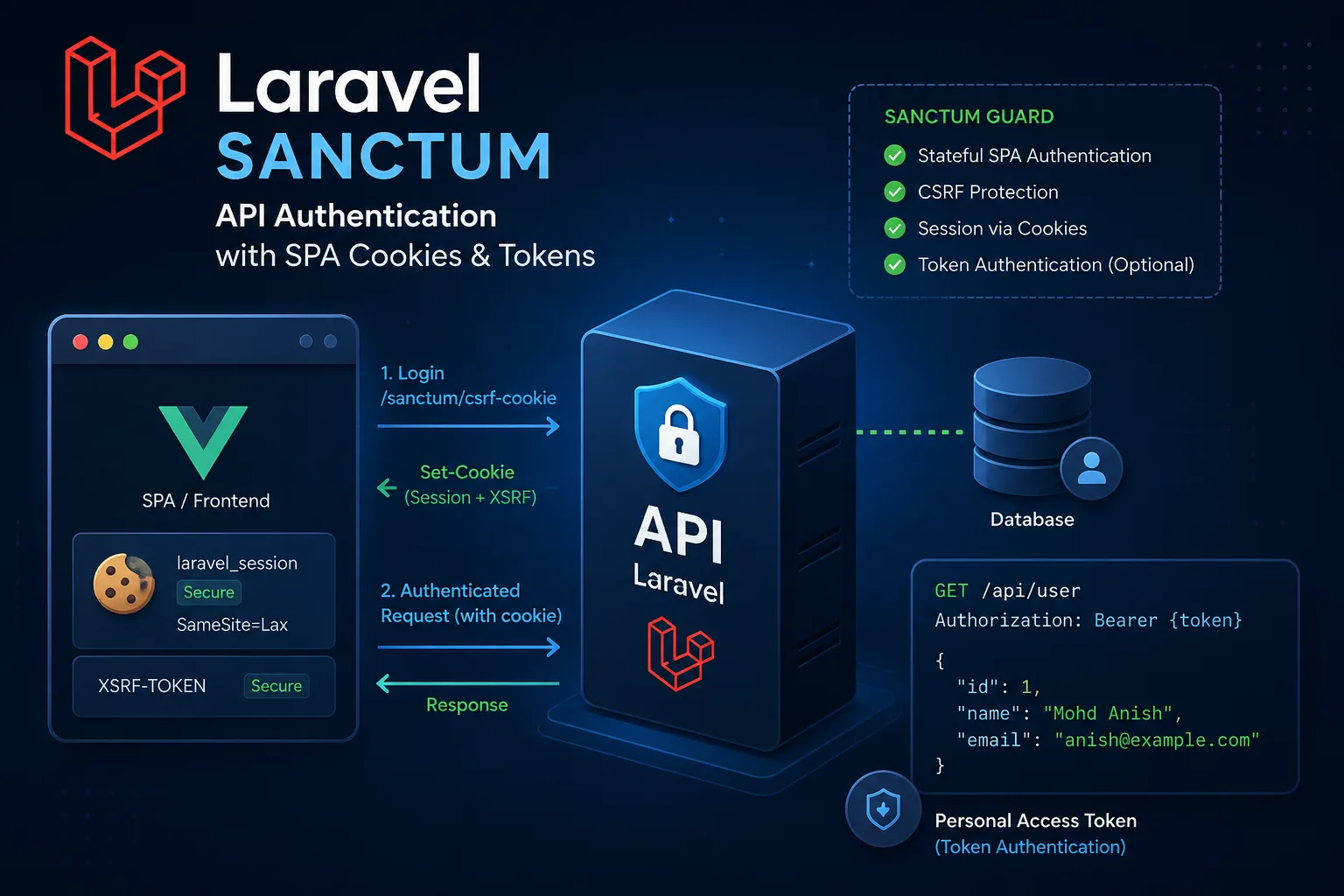
Quick Answer
Laravel Sanctum is the auth package most of us reach for when the API is Laravel and the client is our own SPA or a mobile app. Browsers get session cookies with CSRF protection. Apps and scripts get personal access tokens. You do not need Passport’s full OAuth stack unless third parties must “sign in with your API” in a formal OAuth way.
Quick Facts
Topic: Laravel Sanctum API Authentication
Category: Backend / Laravel Security
Table of Contents
- What Is Laravel Sanctum?
- Why It Matters
- How It Works
- Step-by-Step Guide
- Real Example
- Pros & Cons
- Best Practices
- Common Mistakes
- FAQs
- Key Takeaways
What Is Laravel Sanctum?
Sanctum sits between “roll your own token table” and “install Passport.” Official package, maintained with Laravel, and aimed at the boring-but-real cases: a Vue/Nuxt/React frontend talking to your API, or a mobile client that only needs a bearer token.
I treat it as the default on first-party stacks. Passport still wins when you are building a proper OAuth provider for other companies’ apps. For everything else — dashboard + API, Flutter client, small partner token — Sanctum is usually enough, and you spend your time on product bugs instead of grant types.
On a Laravel + Nuxt setup like the one behind this portfolio stack, Sanctum is the boring, correct choice more often than JWT-in-localStorage hacks.
Why It Matters
- You match the client. Same-site (or configured) SPA → cookies. Phone / CLI / Postman → token. One package, two doors.
- Cookie SPA auth plays nicer with CSRF. Sticking long-lived JWTs in
localStorageis still a common leak path when XSS shows up. Sessions + CSRF are closer to how Laravel already thinks. - Tokens are revocable. Lost phone? Delete that row. You do not have to rotate a global secret and kick every web user at once.
- Middleware stays simple.
auth:sanctumon the route. Sanctum figures out session vs bearer. Your controllers stay readable.
How It Works
Two modes. Mix them in one app if you have a web dashboard and a mobile app.
- SPA / cookie mode. Frontend hits
/sanctum/csrf-cookie, then logs in through a normal session login. Laravel sets session cookies. Later/api/*calls send those cookies. Sanctum checks the session and that the Origin/Referer looks like a domain you listed as stateful. - Personal access tokens. After a successful login (or from an admin “create token” UI), you call
createToken(). Sanctum stores a hash inpersonal_access_tokensand shows the plain token once. Client sendsAuthorization: Bearer …forever after (until you revoke it). - Shared guard. Routes use
auth:sanctum. For a “stateful” request Sanctum prefers the session; otherwise it tries the bearer token. That is why one middleware covers both clients.
If the browser is yours and domains are lined up, use cookies. If the client cannot do cookies sanely, use tokens. Fighting that rule is where most Sanctum pain starts.
Step-by-Step Guide
Steps match Laravel 10/11-style apps. Copy carefully if you are on an older Kernel-based project vs bootstrap/app.php.
Step 1: Install and publish
composer require laravel/sanctum
php artisan vendor:publish --provider="Laravel\Sanctum\SanctumServiceProvider"
php artisan migrate
You should see config/sanctum.php and a migration for personal access tokens. If migrate looks “empty,” check you are not on a scaffold that already shipped Sanctum.
Step 2: User model
use Laravel\Sanctum\HasApiTokens;

class User extends Authenticatable
{
    use HasApiTokens, HasFactory, Notifiable;
}
Without HasApiTokens, createToken() simply is not there. Easy to forget on a custom User model.
Step 3: Stateful domains for the SPA
Cookie mode only works if Sanctum recognizes the frontend host. Local Nuxt on port 3000 counts.
'stateful' => explode(',', env('SANCTUM_STATEFUL_DOMAINS', sprintf(
    '%s%s',
    'localhost,localhost:3000,127.0.0.1,127.0.0.1:8000,::1',
    Sanctum::currentApplicationUrlWithPort(),
))),
Production .env sketch:
SANCTUM_STATEFUL_DOMAINS=app.example.com,www.example.com
SESSION_DOMAIN=.example.com
SESSION_DRIVER=cookie
SESSION_SECURE_COOKIE=true
SESSION_DOMAIN with a leading dot is often what makes api. and app. share the session cookie. Get this wrong and you get “login works, then every API call is guest” — the classic Saturday-night Sanctum bug.
Step 4: CORS + credentials
// config/cors.php (typical shape)
'paths' => ['api/*', 'sanctum/csrf-cookie', 'login', 'logout', 'register'],
'supports_credentials' => true,
'allowed_origins' => [env('FRONTEND_URL', 'http://localhost:3000')],
Frontend must send cookies:
axios.defaults.withCredentials = true;
axios.defaults.withXSRFToken = true; // Axios 1.x

fetch('/api/user', { credentials: 'include' });
If CORS allows * with credentials, browsers will refuse. Explicit origin only.
Step 5: Middleware
Laravel 11’s default API stack often already includes Sanctum’s stateful middleware. On older apps, put this in the api group:
\Laravel\Sanctum\Http\Middleware\EnsureFrontendRequestsAreStateful::class,Then lock routes down:
Route::middleware('auth:sanctum')->get('/api/user', function (Request $request) {
    return $request->user();
});
Step 6: SPA login sequence
GET /sanctum/csrf-cookiePOST /loginwith email/password (web/session guard)- Call
/api/...as usual
await api.get('/sanctum/csrf-cookie');
await api.post('/login', { email, password });
const { data: user } = await api.get('/api/user');
Skip step 1 and Laravel answers with 419. That is CSRF doing its job, not “Sanctum being broken.”
Logout should hit a route that runs the web guard logout and invalidates the session — not only clear Vue state.
Step 7: Token login for mobile / scripts
Route::post('/login', [AuthController::class, 'login']);
Route::middleware('auth:sanctum')->group(function () {
    Route::get('/user', fn (Request $r) => $r->user());
    Route::post('/logout', [AuthController::class, 'logout']);
});
public function login(Request $request)
{
$credentials = $request->validate([
'email' => ['required', 'email'],
'password' => ['required'],
]);
if (! Auth::attempt($credentials)) {
throw ValidationException::withMessages([
'email' => ['Invalid credentials.'],
]);
}
$user = $request->user();
$token = $user->createToken(
'mobile-app',
['orders:read', 'orders:write']
)->plainTextToken;
return [
'token' => $token,
'user' => $user,
];
}Send it as:
Authorization: Bearer 1|…plainText…On logout for that device:
$request->user()->currentAccessToken()->delete();
// or wipe everything: $request->user()->tokens()->delete();
Step 8: Abilities when a token should not do everything
$user->createToken('ci-bot', ['deployments:trigger']);

if (! $request->user()->tokenCan('deployments:trigger')) {
    abort(403);
}
Cookie sessions usually lean on policies/gates for “can this user edit this order?” Abilities shine on machine tokens and narrow integrations.
Step 9: Smoke-test both doors
- Browser: cookies present after login; logged-out calls get 401; missing CSRF → 419.
- Postman: Bearer works; garbage token → 401; after delete, old token dies immediately.
Real-World Example
Team has Nuxt on app.example.com and Flutter hitting api.example.com.
Earlier they jammed JWTs into web localStorage “because mobile needed tokens too.” CORS was fiddly, revoke meant “change APP_KEY and apologize,” and a leaked admin token in a screenshot lived forever in chat history.
With Sanctum split properly:
- Nuxt stays on cookie + CSRF.
- Flutter keeps a token in secure storage.
- Settings UI lists tokens and a “log out this device” button.
- A CI bot gets
reports:readonly — not a god token.
Nothing glamorous. Fewer 2 a.m. auth regressions though, which is the point.
Pros & Cons
Advantages
- Faster path than Passport when you own the clients
- Cookie SPA flow matches Laravel’s session/CSRF habits
- Token create / list / revoke without extra packages
- One middleware name for web SPA and mobile
- Fine with Nuxt, Vue, React, Inertia, Flutter, etc.
Disadvantages
- Not OAuth2 — no polished “third-party developer platform” story
- SPA mode fails loudly if domain/CORS/cookie config is half-done
- Plain token is shown once; if you log it to Slack, you own that incident
- Huge public API marketplaces may still want Passport or a real IdP
Best Practices
- Cookies for your SPA; tokens for everything that is not a first-party browser you control.
- Do not “just use Bearer in Nuxt” out of habit if cookie mode is available.
- Production: HTTPS,
SESSION_SECURE_COOKIE=true, sensibleSESSION_DOMAIN. - Give tokens names and abilities you can reason about six months later.
- Rate-limit login and token minting.
- Sanctum says who the user is. Policies still decide what they can touch.
- Keep login/logout on the web guard for SPA; use token delete for mobile logout.
Common Mistakes
- No CSRF cookie call → 419 on login. Call
/sanctum/csrf-cookiefirst. - CORS credentials off or origin
*→ browser drops cookies. Fix origin list +supports_credentials. - Stateful domain ≠ actual frontend host → session never sticks. Check port in local dev.
- Tokens for the browser “to keep one code path” → you traded UX and XSS posture for convenience. Prefer cookies for first-party web.
- Logout only clears Pinia/Vuex → token or session still valid. Revoke server-side.
- Printing plainTextToken in logs → treat it like a password. DB already has the hash; that is enough.
Frequently Asked Questions
What is Laravel Sanctum?
Official Laravel auth for first-party SPAs (cookies) and for API clients (personal access tokens). Lighter than Passport; usually enough when you are not selling OAuth to third-party developers.
How do I authenticate a SPA with Laravel Sanctum?
Install Sanctum, set stateful domains and credentialed CORS, call /sanctum/csrf-cookie, log in on a session route, then hit auth:sanctum APIs with credentials included on every request.
Laravel Sanctum vs Passport — which should I use?
Sanctum for your own web/mobile clients and simple tokens. Passport (or Auth0/Keycloak/etc.) when you need full OAuth2 for external apps. If you are unsure, you probably want Sanctum.
Is Laravel Sanctum worth it for API authentication?
For most Laravel products, yes. You get a maintained path for sessions and revocable tokens without maintaining a custom auth homegrown mess. Skip it only if your org already standardized on another IdP and Sanctum would duplicate that.
How do personal access tokens work in Sanctum?
createToken() returns the plain token once and stores a hash. Clients send Bearer. You can attach abilities and delete one token or all of them. Compromise response is “delete the row,” not “invalidate the universe.”
Can I use Sanctum with Nuxt.js?
Yes. Point the Nuxt API client at Laravel, turn credentials on, put the Nuxt origin in Sanctum stateful domains and CORS, then CSRF → login → API. Same pattern as Vue or plain Axios.
Summary
Sanctum covers the two auth shapes Laravel apps actually ship: browser sessions for your SPA, bearer tokens for mobile and scripts. Install it, add HasApiTokens, protect routes with auth:sanctum, then finish the boring config — domains, CORS, CSRF — because that is where projects stall.
Pick cookie mode when you own the frontend. Mint scoped tokens when the client cannot hold a Laravel session. Revoke on logout. Keep authorization in policies.
If you are wiring Laravel + Nuxt and want a second pair of eyes on the cookie/CORS path, say hello.
Key Takeaways
- Sanctum = SPA cookies + API tokens, not full OAuth.
auth:sanctumhandles session or Bearer; you choose the mode per client.- Most SPA bugs are CSRF, CORS, or domain mismatch — not “Sanctum itself.”
- Name tokens, scope them, delete them on logout.
- Reach for Passport/OAuth only when third-party delegated login is a real product need.
Comments
0 comments · new ones appear after approval
No comments yet. Be the first to share your thoughts.
Leave a comment
Your comment will be reviewed before it appears.